Sunday, January 26, 2014


iOS 7 is out and everyone knows Apple had been working really hard trying to compete with everyone from Android, HP Palm WebOS, Windows Phone 8. In the process, they copied hell a lot of features, shamelessly.
ios7
Watch iOS 7 Features video before you can understand what was copied from what:

Lets go over all the features, UI elements that iOS 7 copied from other Systems:
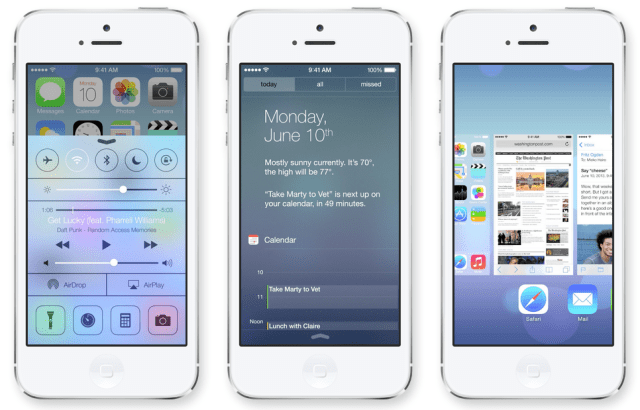
Multitasking / Task Switcher – Copied from WebOS
This comes from good old amazing Palm WebOS that was built for perfection but never payed off in the market. Apple took full advantage of it by copying every aspect of the task switcher. The horizontal carousel of apps with icons was so nicely done in WebOS.

Mail – Copied from Gmail, Mailbox app

Swipe to archive, delete has been inspired by Gmail and Mailbox app on iOS

Mailbox app (App Store)

Calendar – Copied from Sunrise

The new Calendar app now has a default view, top representing default view, and at bottom current events that matter to you. Choose a detail view for a later data, and the whole UI looks a lot like Sunrise app.
iTunes Radio concept is inspired by none other but Radio king Pandora.

Back Navigation – Copied from BlackBerry OS  10

iOS never had back button from Android. They got around the problem by copying BB10′s swipe from left of the screen to go back.

Notification Center / Toggles – Copied from Android, Samsung TouchWhiz

Notifications and Toggles have been improved a lot and learn even more from Android.

Lock Screen – Copied form Android, WP8

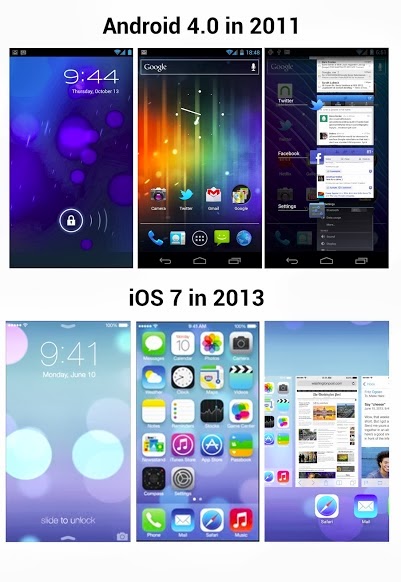
Lock screen looks very familiar, its has android like circles in the wallpaper and WP8 like unlocking gesture.

3D Perspective wallpaper – Copied from Cydia tweak 3D board

The new 3d perspective wallpaper that changes wallpaper perspective as you move the device comes from popular Cydia tweak called  3D board.
This also exists on Android as app called 3d image live wallpaper

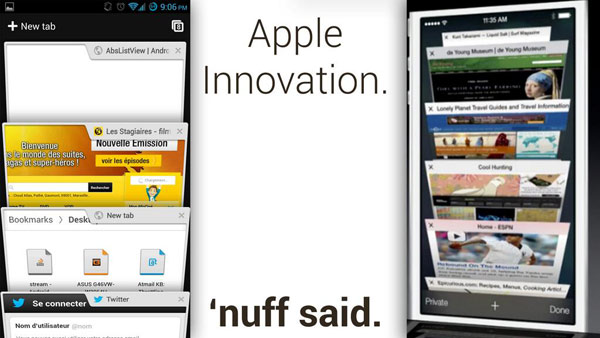
Safari Tabs – Copied from Chrome Android

safari-chrome-ios7

More copies from Android:

iOS 7 looks like a blend of Android Holo Light with MIUI icons, that flat card inspired interface is a great way to traverse your way through what your phone has to offer.
android-vs-ios7

We’ve seen how you can install Windows 95, XP on Android and several other linux flavors.
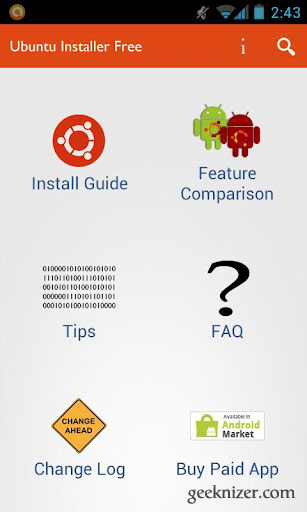
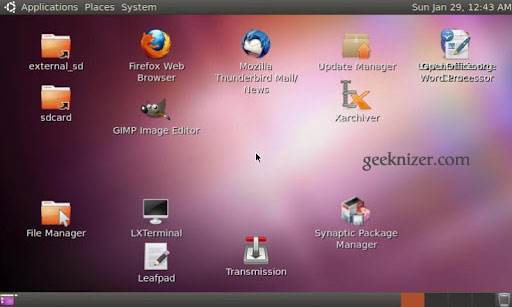
Ubuntu installer is the easiest application that helps you install Ubuntu on your Android, without hassles. All you need is a rooted Android having kernel with Loop support. (scroll to the end for list of supported ROMs / devices)
Setup is very simple, the app downloaded from market includes everything you need to install Ubuntu. It endorses a customized Ubuntu 10.10 image optimized for the ARM processor.
The advantage of this Ubuntu installer over other is that it allows you to run a full Ubuntu system within android. i.e. You can still make calls, text, and use android without having to reboot your phone, no dualbooting or multibooting required.
Ubuntu Installers’ Key features:
  • Run ubuntu within Android.
  • Access to both Android & Ubuntu at same time.
  • Highly optimized for ARM devices.
  • LXDE Desktop (very lightweight)
  • Ubuntu update manager, Software centre fully operational.
  • File system access: Ability to access files on your SD card and internal memory from Ubuntu.
  • Set resolution: Ability to set screen size on boot (you no longer have to download a certain image for different screen sizes!)
  • Choose Ubuntu Installation type: ‘large‘ and ‘lightweight
Large version includes:
  • Download size: 1.5GB, Installation size: 3.5GB.
  • UI: Gnome, LXDE
  • Lots of Apps, idealistic for development: Firefox, Thunderbird, openoffice.org suite, GIMP Image Editor, Emacs Text Editor (geared towards programming), C and C++ build-essential, Java JDK, Python, TeXlive and TeXmaker LaTeX editor, Transmission BitTorrent Client, eVince PDF Viewer, File Manager, Terminal, Image Viewer, Leafpad Text Editor, Synaptic Package Manager and Ubuntu Software Center with all repositories enabled, SSH server, Gnash.
Lightweight image includes:

  • Download size: 500MB, Installation size: 2.5GB once.
  • Basic apps required for everything to work.
Ubuntu Installer Compatibility chart for Android phones / tablets:
Device NameROMKernel
Acer Iconia A500TegraOwners ICS v96Thor v3.9r15
Asus Eee Pad Transformerkrakdrazzle dazzle
Atrix 4GCyanogenmodfaux123′s kernel
Archos 101 Internet TabletUrukDroidUrukDroid
Dell Streak Mini 5DSCDSC
Galaxy Player 4.0Stock 2.3.5Stock
HTC DesireGinger Villain 3.3Ginger Villain 3.3
HTC Desire HDIcy-smokeRCMIX3D-V11.1
HTC Desire SMost RomsAny other than stock
HTC Droid Incredible 2Sabotage Sense v1.2drelisdees #21
HTC EVO 3DStocStock
HTC Flyer WiFi 16GBLeeDroid honeycombLeeDroid honeycomb
HTC GlacierAbsolutiontdj darkside 12 cm
HTC inspire 4gCyanogenmod 7Cyanogenmod 7
HTC ThunderboltLiquid Gingerbread v 3.2Liquid Gingerbread v 3.2
Kindle FireStockStock
Samsung CaptivateCyanogenmod 7Cyanogenmod 7
Samsung Galaxy Note (GT-N7000)Stock 2.3.5Stock
Samsung Galaxy NexusAOKP build 21Franco kernel #15
Samsung Nexus SCyanogenmod 7Cyanogenmod 7
Samsung VibrantICSICS
Motorola Photon 4GJokercomplete V1MoPhoACTV Initiative
Transformer PrimeStockStock
Xperia NeoNEO SE.TWEAKEDInteks Kernel Clean OC
Download Ubuntu Installer from AndroidMarket.


Sony’s flagship device Xperia Z1 improves on original Z and makes it a lot better than before. Sony has done some marvellous job while making this waterproof phone sturdy and attractive on paper. But is it right for you? Read on to find out.

Pros: What’s Good

1. Amazing Build Quality:
Attention to detail and materials used on Z1 and extremely marvellous. Its on par with HTC One and iPhones. Its designed to stun every user. Once you hold this device, you know its like no other. It feels sturdy and rock solid in hand. With solid aluminium tapering the device and glass on front and rear, this is the most premium feel phone money can buy.

1

2. Specs to impress:
Z1 sports top of the line Snapdragon 800 2.24Ghz processor, Adreno 330, 5″ 1080p display, 2GB RAM, Bluetooth 4.0, 4G LTE, etc.
3. Battery life:
Sony offers a sealed 3000mAh. This battery gives you 3hours of screen time plus 1.5 days of standby. Even a heavy user like my very own would not run out of juice in under 24 hours. Light users can juice out 2 days of usage. (All this battery life and sony charges the phone only upto 90-95% for extended life, which means you will not deteriorate battery in 3 years or so.)

--------------------------------------------------------------------------------------------------------------------

Sony offers good options for battery saving. Enabling them significantly reduces battery usage by restricting background apps to consume data/processing when screen is off. You can choose what apps can still connect to the internet. Among other tweaks, you can optionally switch off mobile data, gps, etc when required parameters are met.

Z1 battery life
4. External SD Card: 
Upto 128gb external + 16gb internal. Good transfer speeds.
5. Accurate, clear Display:
Despite marketing misnomers like Trilumnios technology and X-Reality, Xperia Z1 has one of the most accurate display on market. Its produces the right colors, and makes them look closest to the natural colors on any smartphone. Samsung’s AMOLEDs are known to be over saturated, it may be appealing to the most, but its never accurate. Xperia Z1′s display is crisp and easier to read in bright lights vs. AMOLEDs.


1
 2


6. Camera:
Camera is pretty good on paper with 20.7MP, F2.0 Aperture and 1/2.3″ sensor size. That’s the best we’ve seen in Android phones at least on paper. In reality it does a pretty good job too. For day shots, its slightly below Note 3, Optimus G2, but in low-light night shots, its miles ahead. It is not as good as Lumia 1020 but better than Lumia 920, HTC One in low light, otherwise. All-in-all Camera is 2nd best to Lumia 1020, making it best Android camera smartphone.
Two-state Camera hardware button is a great add.


7. Waterproof (up to 1 meter), dust proof – A great add for adventurous folks.
8. Shatter-proof screen guard - The front and rear have a stock Shatter-proof screen guard which will hold the gorilla glass intact in case of any impact.
9. Super fast and Zero lag:
Z1 with its Snapdragon 800, Adreno 330 and blot-free Sony minimal customizations, is among the fastest smartphones. In our speed test Z1 on 4.2.2 is second fastest among android phones falling right behind Nexus 5  on 4.4.1.
10. Clean, Bloat-free OS with usable apps:
Being a Samsung user for long, I’ve always complained about low-quality apps and bloatware in TouchWhiz. For instance, Note 3 idle RAM usage is 1.6GB with 60+ processes running when on idle. Sony has done it right, not only it has few bloat apps, most of the apps are really well designed.
Walkman app is beautiful and featureful. It can play all music formats from MP3, Aac, to lossless audio like FLAC. Sony has OS wide support for DLNA and miracast streaming standards that makes music and video streaming from network a breeze. e.g. You can view, play and control music playback on your XBMC (or any DLNA enabled TV, mediabox, PC) from the walkman app. For music, photos and videos, it acts as DLNA renderer, DLNA server, DLNA client. i.e. you can control music on other devices, stream from other to local, and stream to other devices on the network. This is the cleanest and most seamless implementation of DLNA ever seen on Android phones, just like AirPlay on iOS.
Gallery app, Camera app, etc all have an easy and usable interface.

Cons: Whats Bad

1. Bad viewing angles:
This could be blessing for few and nightmare for others. Screen is perfectly colorful, rich in contrast when looked head-on. Flip the screen more than 20 degrees and colors, luminosity,  contrasts start to fade drastically. But how many times do you view your phone like that? For others, it provides additional privacy not offered by other displays. The reason behind poor viewing angles is Sony has used TN display technology rather than IPS.
2. Camera processing:
The camera hardware is pretty capable but Sony has software issues. The software suffers from focus-hunting, back focus (rare), over-sharpened images and high noise (with detail preserved). In general Xperia Z1 vs. Note 3, one can see sharper pictures from Z1, but they are noisier. Sony has history of screwing up software initially, and then improving it over time. The trend has been seen in Xperia smartphones, and alpha camera lineup. It would get better with time.
The camera app also tends to overexpose images by 1-2 stops. Work-around right now is to use manual mode and use -0.7 exposure compensation for taking shots.
It is said that coz Sony had software issues with camera, they removed 4K video support prior to release. If they manage to fix noise issues, 4K should be coming soon.
If Sony is listening, I would like to see more manual controls on camera: Manual focus, manual shutter speed, ISO and aperture.
3. Heavy:
Phone is significantly heavier than any other phones in market. At 170g, its heavier than HTC One, Note 3 and any other android phone. Yet, phone is comfortable.
4. Prone to scratches:
The stock shatter-proof screen guard has its demerits: Its prone to scratches. You’ll have to put screen guard on front and rear in order to avoid ruining the anti-shatter guard. Removing it also removes the Sony logo from front, and your warranty. Make sure you get a good oleophobic, anti-scratch protector.
5. Not a modder’s paradise (yet):
Sony has screwed up bootloader on Xperia Z1. Developers still cant get access to Camera hardware on custom ROMs. As a result, there are not many custom ROMs on Z1. But its a matter of time. Sony would fix the issue with upcoming Android 4.4 update early next year, if not any sooner.
with android 4.3 rollout to Xperia Z1, problem is solved.
6. Underwhelming loudspeaker:
From a Sony phone one expects brilliant loudspeaker (like on good old walkman series), but sadly enough water proofing muffles up the speaker, and quality from the loudspeaker is slightly worse than Samsung Galaxy phones, but its quiet loud for most users. This shouldn’t bother many users. However, 3.5mm audio output is on par with other Snapdragon 800 phones.
Checkout High quality Z1 close-up photos
VERDICT
Xperia Z1 is a phenomenal Sony smartphone. But it may not be right for everyone. After using Note 3, Nexus 5, Optimus G2, I settled with Xperia Z1.

What is Mediaserver?
Mediaserver or Media scanner on Android is designed to scan and index every media file: Images, Videos, Music and make the list available to all Android apps, so that they don’t have to do the repetitive tasks. But it isn’t perfect.
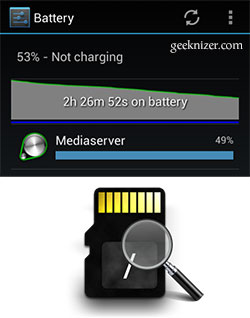
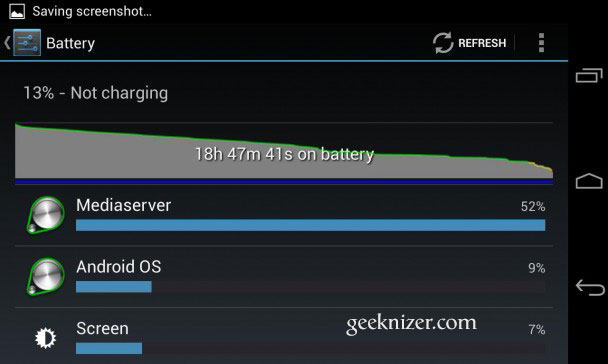
Media server can have strange behaviors and tends to be buggy. Very often you can end-up shedding 50% of your battery on Media scans. Not only does media scanner go wrong on custom ROMs but many of the official stock ROMs too. So out of the blue, one day the media scanner would run crazy and drain your battery.
mediaserver-battery

How to Fix Mediaserver / scanner Battery drain

One quick way to get around is to stop Media scanner service altogether (using apps on Play store) but that way your songs, photos, videos would vanish from your gallery, music player.
The situation is more frequent once your sdcard (internal or external) gets old and you’ve lots of files.
mediaserver-battery-drain
I had been digging out how to fix it, and here are my solutions. Perhaps try al of them, it would definitely relieve your cpu and battery usage by large. Solution works on any Android version:

Solution 1. Clear media storage data

The simplest solution is to clear media storage database and let it restart the process from scratch. Chances are this will fix most of the issues with Mediascanner/Mediaserver. Do the following, and it should help ease-out the pain:
Settings > applications > Media Storage > clear data, force stop and reboot.

Solution 2. Remove unwanted media files

Mediaserver really does a hard job while analyzing each media file it encounters, reading metadata, generating thumbnails, inserting into Android mediastore database. You can ease-out its processing by removing unwanted, trash files.
Navigate to /sdcard/DCIM/.thumbnails and delete all files. Repeat for external sd card. On AOSP ROMs, Android gallery creates too many of thumbnails that later becomes problematic for media scanner. Deleting them once in few months is a good idea.
Note: If this is a very slow process, use adb commandline to delete these
adb shell
cd /sdcard/DCIM/.thumbnails
rm *

Solution 3. Analyze and Delete excessive media files

As we discussed in solution 2 that mediaserver can be doing heavy lifting due to excessive media files on sdcards. In this step we find-out what files are causing media scanner to go mad.
You can use any sdcard analyst from Play Store (I use ES file manager > menu > Sd card analyst) to determine which directory has lots of files/subdirectories. Any directory having >1000 files/folders is an alarmingly high number. Get rid of them (if you can). However, do not delete any apps/system files in the process.

Solution 4. Probe and Delete bad/damaged media

If you’re sure you’ve tried above solutions and still encountering battery drain, its time to dig deeper with the help of Android developer tools.
Pre-requisites:
  1. You must be rooted,
  2. Android developer tools setup with ADB being able to detect devices connected to USB (Windows, OS X, or Linux)
With ADB tools installed, enter shell and acquire SuperUser permissions:

adb shell
su
Note: You might be prompted on phone to authorize superuser access. You must Grant it
Then run “top” (linux process manager) to see which process is eating your phone’s CPU. The command below filters top results related with media scanner:
top -grep media
Running the above command would respond something like:
130|root@n7000:/ # top | grep media
1905 0 15% S 7 23080K 6168K bg media /system/bin/mediaserver
2808 0 42% S 3 3524K 740K media_rw /system/bin/sdcard
2825 0 11% S 19 255832K 43936K bg u0_a5 android.process.media
%age cpu shows media server is eating cpu and needs to be fixed. Run the following command to determine which file is it currently reading.
lsof | grep media_rw
root@n7000:/ # lsof | grep media_rw
sdcard 2808 media_rw exe ??? ??? ??? ??? /system/bin/sdcard
sdcard 2808 media_rw 0 ??? ??? ??? ??? /dev/null
sdcard 2808 media_rw 1 ??? ??? ??? ??? /dev/null
sdcard 2808 media_rw 2 ??? ??? ??? ??? /dev/null
sdcard 2808 media_rw 3 ??? ??? ??? ??? /dev/fuse
sdcard 2808 media_rw 4 ??? ??? ??? ??? anon_inode:inotify
sdcard 2808 media_rw 5 ??? ??? ??? ??? /mnt/media_rw/sdcard1
sdcard 2808 media_rw 6 ??? ??? ??? ??? /mnt/media_rw/sdcard1/audiobooks
sdcard 2808 media_rw 7 ??? ??? ??? ??? /mnt/media_rw/sdcard1/audiobooks/2-14 Einstein CD 02- Track 14.mp3
If the media service is stuck at a directory/file for a long time, you know it’s a damaged media file, you should probably get rid of it.
Once you get rid of all such files/directories, its guaranteed media server would finish scanning soon enough.

Solution 5: Format SD cards

If nothing works (or you’re noob enough to try solution 4): Take backup and format Internal, external SD card and copy only selective files/folders that you need. Problems would go away for sure.

Solution 6: Disable Media scanner

If your Droid is against you and it just won’t tame, its time to disable the media scanner. You can do this from adb shell

adb shell
su
pm disable com.android.providers.media/com.android.providers.media.MediaScannerReceiver
You can re-enable it later with:


pm enable com.android.providers.media/com.android.providers.media.MediaScannerReceiver
Say goodbye to mediascanner problems, forever.
Still got problems? Leave your logs in the comments section, we will get back to you as early as possible.


 1 - Power users love to play with their Android phones and often they experiment installing Linux flavors on their Android phones.
XDA developer mnomaanw has successfully installed Windows 95, Windows 98, Windows XP and Linux on HTC EVO 3D in a fairly easy process. To summarize, all a user needs to do is download the required software, modify a file or two and run the apk.  And it boots into Windows.

This Windows port for Phones is one of the best ever. It does fair justice to the hardware buttons, touchscreen by giving you fairly easy controls.
How to Install Windows 95, 98, XP on Android Phone: HTC EVO 3D
Pre-requisites: Windows 95/98/XP Image: ISO or .IMG. (IMG preferred and tested).
Step 1. Download bochs.apk [mirror] and SDL.zip [mirror]. Put SDL.zip on root of sdcard/
Step 2. Put the Windows 95/98/XP disk image .img/.iso [(need to change setting in bochsrc.txt accordingly (iso not tested yet)] of any operating system in SDL folder and rename it to “c.img”.
Step 3. Run Bochs apk. Let it boot (takes a while) and enjoy.
Note: Use this bochsrc.txt to use a folder called “HDD” on your sdcard as a drive in windows. Replace the original bochsrc.txt withthe one stated before. Further updates on xda thread.
Instructions for input controls are as follows:
  • To emulate touchpad on touchscreen and left/right mouse buttons on volume
  • You can also click touch screen to generate mouse left button click.(this does not work everytime)
  • Back = BackSpace, Menu = Enter, left-upper corner click generates TAB
  • left-lower corner click popups keyboard

So what if Apple will not allow Java to come on iPhone? We have a workaround living for a year now. But not many people know about it, and it’s scattered. But I`ll make it easy for you.
Disclaimer- It’s illegal to jailbreak and blah blah, do it at you own risk.
Here is an Easy Tutorial -
Pre-requistes – You iPhone should be Jailbroken and “terminal” installed. You can follow the guide here.
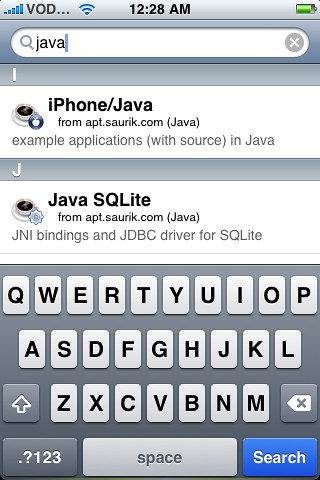
Step 1. Goto Cydia and search for “Java” and install it. The package is Approx. 12mb in size and installs Classpath, iPhone/Java, JamVM, Java SQLite, JocStap, etc. In addition few sample applications with source are installed (HelloJava, HelloScript). Then search for “Jikes“, the compiler or javac equivalent, and install it.
Step 2. Now it’s time to write some code. There are two ways either create .java file with your favorite editor  and transfer to iPhone or directly use vi editor on iPhone (later would be very cumbersome to do.). If you make first choice, use WinSCP or any other SFTP client to transfer file to iPhone. You an use any directory. I`ll use /tmp for my example.

Step 3. If you are developer, you know the next step. Open “Terminal” and type in “su” enter, followed by root password i.e. “alpine”. Then validate java installation “java -version”. It would display “1.5.0 “and the build info, compiled with GCC on Apple bla bla. and also type “jikes” and test. So we are ready. to compile the code. (root permissions are required to create .class file as a result of compilation)
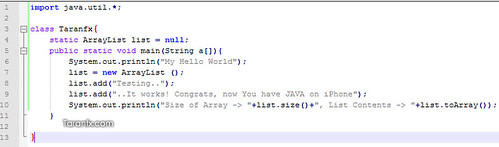
Step 4. Navigate to location where you placed your java source file. “cd /tmp” and then compile the file using command
“jikes Taranfx.java -cp /usr/lib/rt.jar”
You will have to mention the classpath during compile, else it will not work.
Then run it using standard command
java Taranfx
And you get the output :)


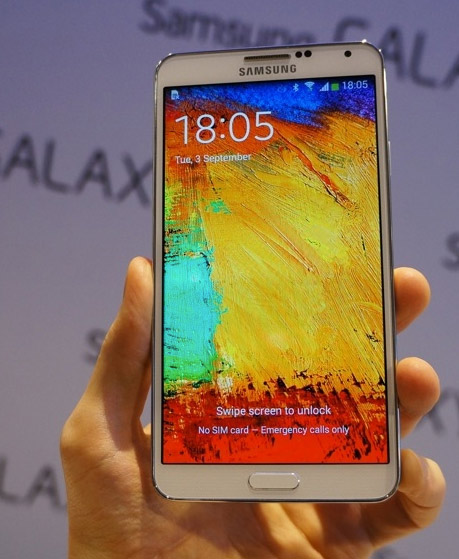
Samsung announces new Galaxy Note 3, a flagship powerful descendent for the Phablet Note family.
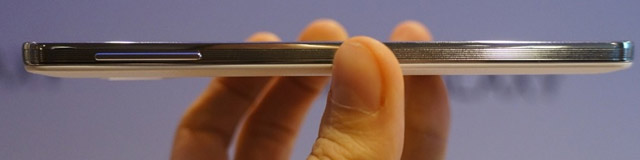
Note 3 learns from Galaxy S4′s design and improves on it. Note 3 is a lot lighter and thinner than Note 2, yet, it has bigger screen at 5.7″ instead of 5.5″ of Note 2. Samsung has already upped every single spec of the device including battery life.
note3-front
international education conference,
Let’s go over the complete specs in detail:

Galaxy Note 3 Full Specs

  • Display: 5.7″ FullHD (1920×1080) Super AMOLED+, 384dpi
  • CPU: 2.3Ghz Snapdragon 800 (US) or 1.9Ghz Exynos 5 Octacore (International)
  • GPU: Adreno 330 (US) or Mali 450 (8-core GPU) (International)
  • RAM: 3GB
  • Camera: Rear – 13MP for still, 1080p at 60FPS slow motion & 4K video @ 30fps, 3.1MP front
  • Battery: 3200 mAh
  • Connectivity: Dual band Wifi, Bluetooth 4.0, 4G LTE, NFC
  • Storage: 32gb, 64gb
  • OS: Android 4.3
 Note 3 Features:
  • All new Improved S-Pen
  • Improved, faster Multitasking
  • Action Memo allows users to handwrite a note and automatically execute a function or convert that handwritten information into formatted content. Action Memo can instantly initiate a call, add to contacts, look up an address on a map, search the web, save a task to a to-do list, and more
  • Scrapbook enables users to organize or track down content and information from various sources including the web, YouTube and Gallery in one place so that users can easily look back at collected content all at once.
  • S Finder allows users to expansively search for content on their device regardless of the type. Search documents, events, communication threads, and even the Help page – all in one place. Also searches hand written content.
  • Screen write
  • Pen Window
Note 3 Features on Video:

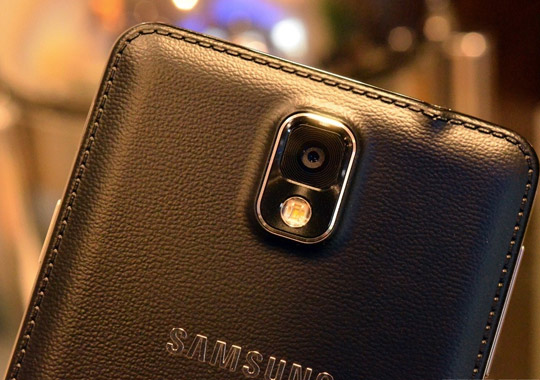
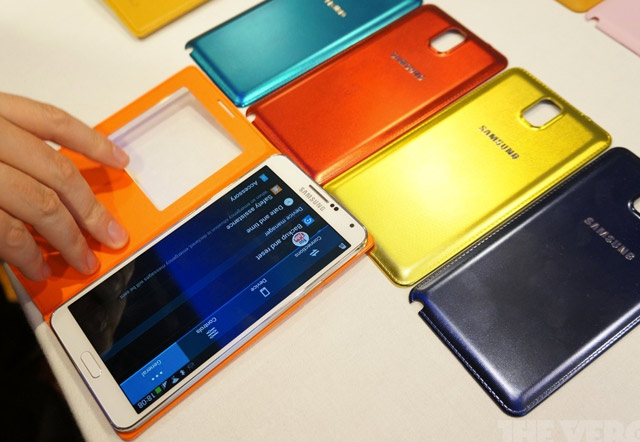
Design There are big improvements to the design. Samsung’s attention to detail has certainly raised, though its not even close to HTC. The back cover is now made up of faux leather but has the same plastic inside. Like S4′s design, the sides of the Note 3 have been given a metallic look, though they are plastic.

The Note 3 gains screen size without gaining increase in form factor. Its still comfortable to hold in hands, it only feels better than Note 2 when held.
note3-back note3-back-covers note3-thickness


Note 3 Price & Availability
Note 3 would be available in October in US and September end for rest of the world. Note 3 is priced at $699 unlocked.